Recall from Chapter 7 that \(a\in\{0,1\}\) denotes a binary treatment. Let \(x\in\mathcal{X}\) denote a mediator variable. The objective here is to obtain counterfactuals \((a=1,\boldsymbol{x}(1))\) for untreated units\((t=0,\boldsymbol{x})\), when the variable \(x\) is categorical.
As in Chapter 7, consider the case where \(x\in\{A,B,C\}\) with the following group-wise proportions: \(\boldsymbol{p}_0 = (0.1, 0.5, 0.4)\) (untreated units) and \(\boldsymbol{p}_1 = (0.5, 0.3, 0.2)\) (treated units). The proportion in group 0 are shown in Figure 10.1.
8.1 Preliminary Example: 1-to-1 Random Matching
Let us generate a dummy data set with 100 individuals in both Group 0 and Group 1.
A way to obtain the counterfactual for the categorical variable is to implement a 1-to-1 matching procedure.
Each category is assigned an arbitrary numeric value (e.g., \(A = 1\), \(B = 2\), \(C = 3\)), allowing us to define a cost matrix based on the absolute difference between encoded categories. That is, the cost of matching an individual from Group 0 with category \(x_{j0}\) to an individual from Group 1 with category \(x_{i1}\) is given by \(C_{ij} = |x_{i1} - x_{j0}|\).
A linear sum assignment problem can then be used to find the matching that minimizes the total cost across pairs.
The matched category from Group 1 is interpreted as the counterfactual category for the initial Group 0 individual.
We can compute the distance between the observations from Group 0 to Group 1, by setting numeric values to each category: A=1, B=2, C=3:
We compute the number of observations from Group 0 matched with observations from Group 1 per category.
tb_coupling |>group_by(x0, x1) |>count() |>group_by(x0) |>mutate(prop_0 =100* n /sum(n)) |>group_by(x1) |>mutate(prop_1 =100* n /sum(n))
# A tibble: 5 × 5
# Groups:   x1 [3]
  x0    x1        n prop_0 prop_1
  <chr> <chr> <int>  <dbl>  <dbl>
1 A     A        10    100     20
2 B     A        20     40     40
3 B     B        30     60    100
4 C     A        20     50     40
5 C     C        20     50    100
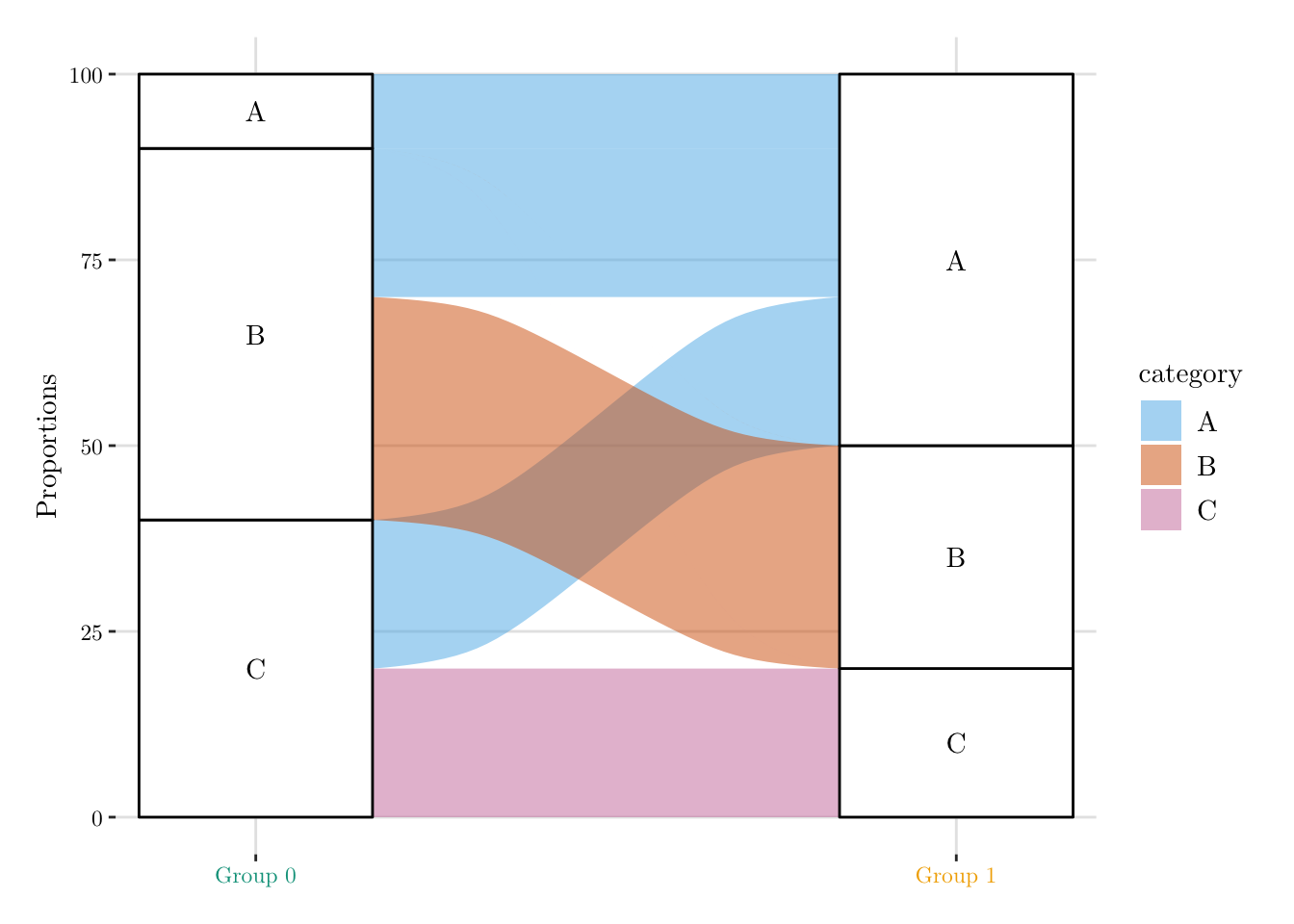
Then, we can visualize the results, using an alluvial plot (Figure 8.1). All individuals in Group 0 with label A are matched directly to individuals in Group 1 with the same label. The remaining individuals in Group 1 labeled A are then matched to Group 0 individuals who originally had label B or C. This matching is performed probabilistically: among Group 0 individuals with label B, 60% retain their original label, and 40% are reclassified as A; among those with label C, 50% remain C, and 50% are reclassified as A.
Figure 8.1: Matching individuals given a categorical variable.
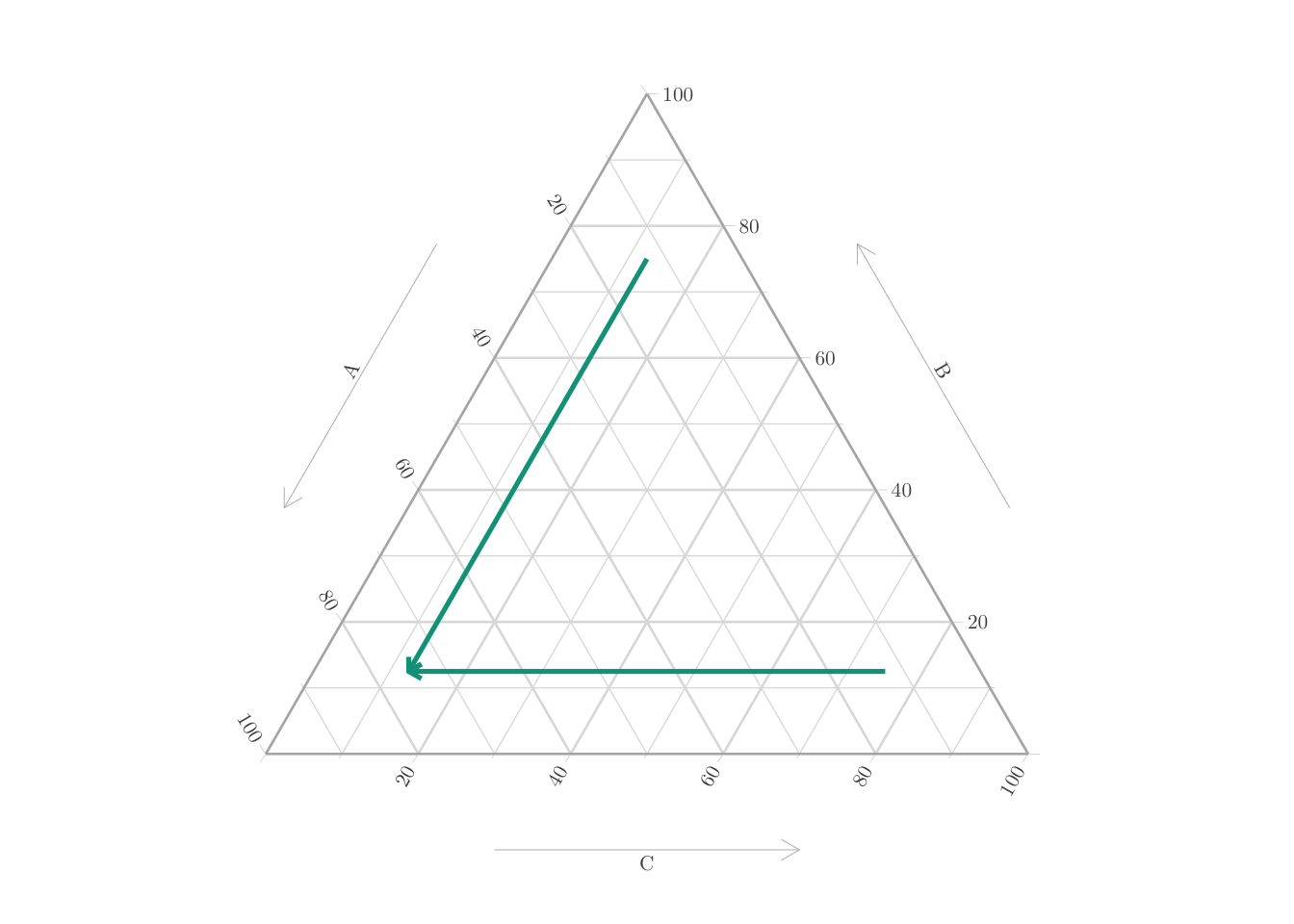
This can also be visualized on a ternary plot (Figure 8.2).
Codes to create the Figure.
# Create interpolated values using McCann (1997) displacementf_line_simplex <-function(x, y, lgt =601) { zx <-as.numeric(clr(x))[1:2] zy <-as.numeric(clr(y))[1:2] t <-seq(0, 1, length = lgt) tx <-cbind( (1- t) * zx[1] + t * zy[1], (1- t) * zx[2] + t * zy[2] ) tx <-cbind(tx, -(tx[, 1] + tx[, 2])) df <-as.data.frame(matrix(as.numeric(clrInv(tx)), lgt, 3))names(df) <-c("A","B","C") df}# dummy dataset to create an empty ternary plotSB <-tibble(A =c(0.2, 0.3, 0.5, 0.6),B =c(0.3, 0.4, 0.2, 0.1),C =1-c(0.2, 0.3, 0.5, 0.6) -c(0.3, 0.4, 0.2, 0.1),group =c("0", "0", "1", "1"))p_2 <-ggtern(data = SB, aes(x = A, y = B, z = C)) +scale_colour_manual(name ="group", values = col_group) +guides(colour =guide_legend(override.aes =list(linetype ="solid",shape =NA,size =1.5,alpha =1 ) ) ) +theme_light(base_size = font_size, base_family = font_family) +theme_ggtern_paper() +theme(legend.title =element_text(size = font_size),legend.text =element_text(size = font_size)# tern.axis.hshift = .10 ) +theme_latex(TRUE) +theme_hidetitles()p_2 <- p_2 +geom_text(mapping =aes(x =0.9, y =0.06, z =0.08), label = p1[1], color = col_group[2], family = font_family, size = font_size-3, size.unit ="pt") +geom_text(mapping =aes(x =0.09, y =0.9, z =0.09), label = p1[2], color = col_group[2], family = font_family, size = font_size-3, size.unit ="pt") +geom_text(mapping =aes(x =0.08, y =0.06, z =0.9), label = p1[3], color = col_group[2], family = font_family, size = font_size-3, size.unit ="pt") +geom_text(mapping =aes(x =0.3, y =0.1, z =0.11), label = p0[1], color = col_group[1], family = font_family, size = font_size-3, size.unit ="pt") +geom_text(mapping =aes(x =0.15, y =0.65, z =0.25), label = p0[2], color = col_group[1], family = font_family, size = font_size-3, size.unit ="pt") +geom_text(mapping =aes(x =0.1, y =0.2, z =0.8), label = p0[3], color = col_group[1], family = font_family, size = font_size-3, size.unit ="pt") Li1 <-f_line_simplex(x =c(.75, .125, .125), y =c(.125, .125, .75), lgt =2)Li2 <-f_line_simplex(x =c(.75, .125, .125), y =c(.125, .75, .125), lgt =2)p_2 <- p_2 +geom_line(data = Li2, aes(x = A, y = B, z = C), color = col_group[1], linwidth = .6,arrow =arrow(length=unit(0.20,"cm")) ) +geom_line(data = Li1, aes(x = A, y = B, z = C), color = col_group[1], linwidth = .6,arrow =arrow(length=unit(0.20,"cm")) ) p_2
Figure 8.2: Matching individuals given a categorical variable, on a Ternary plot.
Codes to export the figures in PDF.
p_matching_indiv <- cowplot::plot_grid(ggplotGrob( p_1 +# Remove top/bottom margintheme(plot.margin = ggplot2::margin(t =0, r =0, b =0, l =0) ) ),# table_grob,ggplotGrob( p_2 +# Remove top/bottom margintheme(plot.background =element_rect(fill ="transparent", color =NA),plot.margin = ggplot2::margin(t =0, r =0, b =0, l =0) ) ),rel_widths =c(1.4,1),ncol =2)p_matching_indivfilename <-"ternary-categ-matching-indiv"ggsave( p_matching_indiv, file =str_c(path, filename, ".pdf"),height =2*1.75, width =3.75*1.75,family = font_family,device = cairo_pdf)# Crop PDFsystem(paste0("pdfcrop ", path, filename, ".pdf ", path, filename, ".pdf"))
Rather than randomly matching individuals, we can use optimal transport to do the assignment. In Chapter 9, we begin by arbitrarily assigning numerical values to each category and computing pairwise distances based on these values. In contrast, Chapter 10 relies on an which consists in representing the categorical variable in the probability simplex, using probability vectors that reflect the likelihood of each category.